
Last updated: October 20, 2026
A casino app is software you install on your phone to open a casino’s games and account in one tap, while a mobile casino runs in your phone’s web browser with nothing to install. The account, games and payment options are usually the same either way, so the choice comes down to storage, updates and which phones are supported. Before you play on your phone, check five things: where the app comes from, whether it supports your device, how your account is secured, which payment methods work on mobile and which responsible gambling tools you can reach. This guide covers each check and how app and browser play compare.
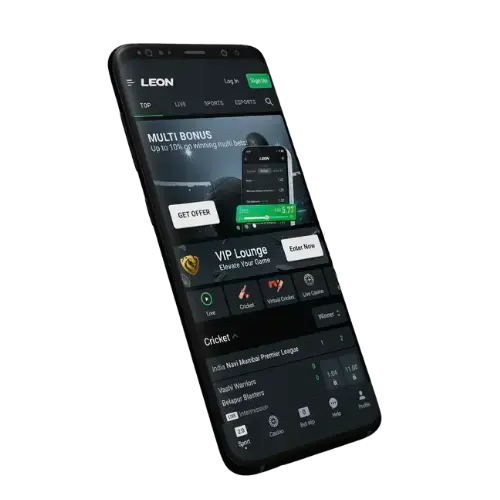
What Is a Casino App?
A casino app is a program installed on your phone that opens a casino’s games, account and cashier without going through a web browser. A mobile casino is the same service built to fit a small screen and opened in a browser such as Chrome or Safari.
Some apps are listed in an app store, and others are installed as a file downloaded from the casino’s own website. LEON Casino’s Android app is the second kind: it is not on Google Play, so it is downloaded from LEON’s site instead.
Casino App or Mobile Browser: Which Should You Use?
Use the app if you play often on one Android phone and want one-tap access and alerts, and use the mobile browser if you are on an iPhone or would rather not install anything. Both open the same account, so you can switch between them.
| Casino app | Mobile browser | |
|---|---|---|
| Setup | Download and install a file | Nothing to install |
| Phone storage | Uses space on your phone | No extra space beyond the browser |
| Updates | Installed through the app | Always the current version of the site |
| Notifications | Can send promotion and game alerts | Usually none |
| Signing in | Stays signed in on that phone | Signs in through the browser |
| Phones supported at LEON Casino | Android only | Android and iPhone |
Does LEON Casino Have an App?
Yes, LEON Casino has an app for Android phones, downloaded from LEON’s Android app page. There is no LEON Casino app in the Apple App Store, so iPhone and iPad users play in the mobile browser with the same account.
Can You Put a Mobile Casino on Your iPhone Home Screen?
Yes, Safari can save any website to your home screen as an icon that opens it like an app. Open the casino’s site in Safari, tap the Share button, then choose Add to Home Screen.
The icon is a shortcut to the website, not an App Store app, so there is nothing to install or update. It is the closest an iPhone user gets to an app at LEON Casino.
How Do You Install a Casino App That Isn’t on Google Play?
You download the installation file (an APK) from the casino’s own site and allow your phone to install it. On most Android phones the steps are:
- Open the casino’s official download page in your phone’s browser.
- Download the APK file.
- When your phone asks, allow your browser to install apps from unknown sources. The setting sits under Settings, then Security or Apps, depending on your phone.
- Open the downloaded file and follow the install prompts.
- Switch the unknown sources permission back off once the app is installed.
Be wary of casino apps found by searching an app store. Many are free social casino games played with virtual coins rather than a casino’s own app. Only download an APK from the casino’s official domain. Copies of casino sites with lookalike domain names exist, and an app file from one of them may not come from the casino at all. If you are unsure, open the casino’s main site first and follow its own download link.
What Should You Check Before You Play on Your Phone?
Check the app’s source, your device, account security, payments and limits before your first deposit. Each takes a minute, and each is easier to sort out before you play than after.
- Source: the download link comes from the casino’s official site, not a search ad or a forwarded file.
- Device: your phone is supported. At LEON Casino, that means Android for the app, or any phone through the browser.
- Account security: your identity is verified. Withdrawals at LEON Casino require it, and the KYC process explains which documents to upload.
- Payments: the method you plan to use works on mobile. LEON Casino supports PayID alongside its other deposit options.
- Limits: deposit, wager and session-time limits are set before you start, not after a long session.
How Do You Keep Your Account Secure on a Phone?
Lock your phone with a PIN or fingerprint, keep your password private, and sign out if anyone else uses the device. LEON Casino’s Terms and Conditions state that the site uses SSL encryption and that players are responsible for keeping their login details secure.
Avoid signing in on shared or public devices. Keep your phone’s operating system updated, because updates often include security fixes.
Can You Claim Bonuses on a Casino App?
Yes, bonuses are claimed through the casino’s cashier, which works on a phone in both the app and the browser. LEON Casino’s welcome offer is 100% up to A$1,000 plus 100 Free Spins, claimed by selecting “100% Welcome Bonus + 100 FS” with a deposit of at least A$30 within 40 days of opening an account. 18+, T&Cs apply.
LEON Casino also lists an Android app reward on its promotions page, so check the current terms there before you download. 18+, T&Cs apply. Casino Welcome Bonus Terms Explained covers the wagering and time limits to read before claiming any offer.
Frequently Asked Questions About Casino Apps
What is the difference between a casino app and a mobile casino?
A casino app is installed on your phone, while a mobile casino runs in your phone’s web browser. Both give access to the same account, games and payments.
Does LEON Casino have an iPhone app?
No. LEON Casino’s app is for Android only. iPhone and iPad users play LEON Casino in the mobile browser.
Can I download the LEON Casino app from Google Play?
No. The LEON Casino Android app is downloaded from LEON’s own site as an APK file, not from Google Play.
Is the LEON Casino app free?
Yes. The LEON Casino Android app is free to download and install.
Can I play live dealer games on my phone?
Yes. LEON Casino’s live casino games stream in HD and can be played on mobile, tablet or desktop.
Can I set deposit limits on my phone?
Yes. LEON Casino offers deposit, wager and session-time limits, plus temporary or permanent self-exclusion, which you can set from your account.
Getting LEON Casino on Your Phone
Android users can install the app from LEON’s Android app page, and iPhone users can play straight from the browser. Once you are in, the LEON Casino live casino is one tap away on either.
Create your LEON Casino account
18+. Set deposit limits and find support with LEON Casino’s responsible gambling tools.